 How to Trade in Brighter Shores
1 Unlock trading in Crenopolis
Trading becomes available once you reach Crenopolis and complete the quests that introduce the Merchants' Guild. Unlocking it the first time requires a Premium Pass — but if your pass later expires, you can still trade with other ex-premium players.
It's an opt-in, permanent choice. You either become a Guild Member (can trade) or a Lone Wolf (cannot trade). There's no gameplay advantage to Lone Wolf — it's purely for the extra challenge or prestige — and both earn their own name and leaderboard badges. If you're not sure, pick Decide Later to keep your options open.
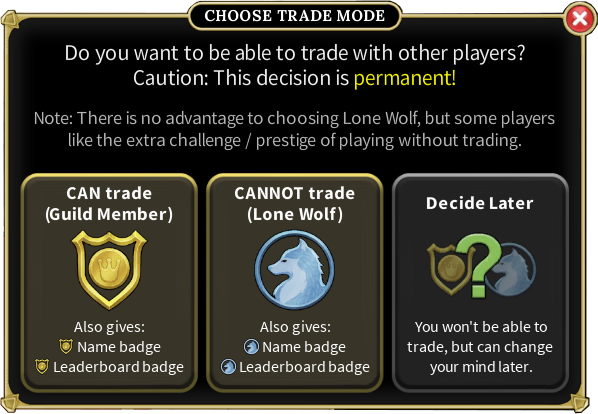
Not sure which to pick? Read our full Lone Wolf vs Guild Member breakdown
2 Start a trade with another player
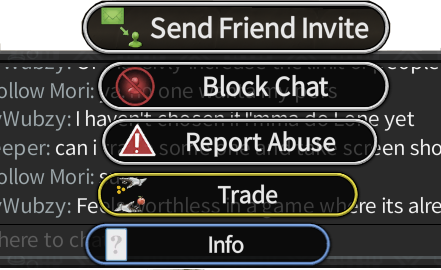
As a Guild Member you can trade with any player, anywhere, straight from your inventory. Select the player you want to deal with — from the chat panel or by clicking them in the world — and choose Trade from the menu to send them a trade request.
3 Make the offer in the trade window
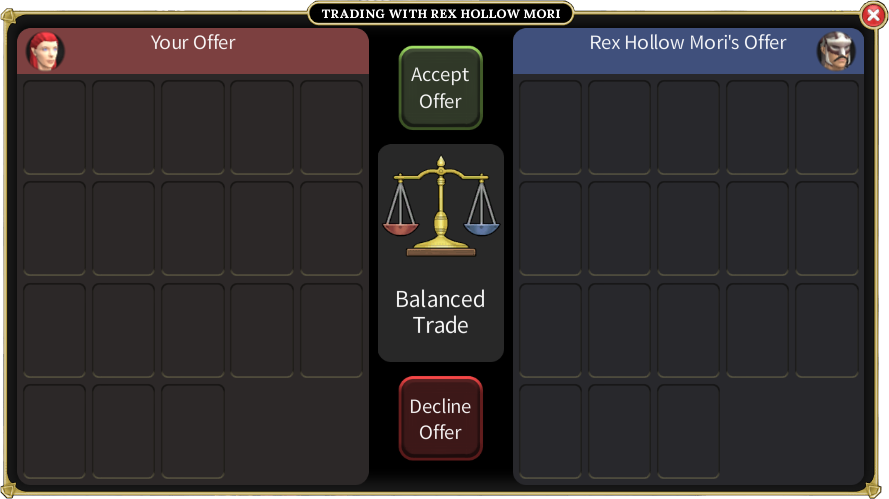
The trade window puts both offers side by side — your offer on the left, the other player's on the right. Add the items and coins you're putting up, and the central Balanced Trade scale shows the deal at a glance. The trade only completes when both players press Accept Offer; either side can Decline Offer at any time, so nothing happens without mutual agreement.
4 Trade bank-to-bank at the Merchants' Guild
For bigger deals, head to the Player Market area surrounding the Merchants' Guild in Crenopolis. There you can trade directly bank-to-bank — no need to carry stacks in your inventory. Pick the items and quantities straight from your bank, add coins with the money selector, and confirm the trade as normal. It's the easiest way to move bulk crafting materials and high-value goods.


 Frequently asked questions
- Do you need a Premium Pass to trade?
- Yes, to unlock trading the first time. If your pass later expires you can still trade — but only with other players who have also previously had premium.
- Where do you unlock trading in Brighter Shores?
- In Crenopolis, after completing the quests that introduce the Merchants' Guild. You then choose to be a Guild Member (can trade) or a Lone Wolf (cannot trade).
- Can a Lone Wolf trade?
- No — Lone Wolves opt out of trading entirely, and the choice is permanent. There's no gameplay advantage to it; it's a challenge/prestige playstyle. See the Lone Wolf vs Guild Member guide.
- How do you trade straight from your bank?
- Stand in the Player Market around the Merchants' Guild in Crenopolis. There you can trade bank-to-bank, selecting items and quantities from your bank and adding coins without carrying them in your inventory.
- How do I find someone to trade with?
- Browse the live trade listings to see what players are buying and selling right now, then meet up in-game to complete the trade. You can also post your own listing on the Adothria marketplace.
 Find a trade right now
Browse hundreds of live Brighter Shores buy and sell listings, then meet up in-game to make the deal.
Browse live trades Adothria Marketplace
 Trading on the Wiki
 About this site